Implementer's guide to conformance
The C2PA conformance program for generator products helps you demonstrate that your product implements Content Credentials correctly when signing assets. It verifies that your product conforms to the specification and that your implementation meets certain security requirements.
Conformance helps the ecosystem function by improving interoperability between products, giving consumers confidence that Content Credentials can be trusted, and encouraging alignment around the current 2.x specification series rather than fragmenting across older versions.
This guide assumes your implementation is complete and ready for evaluation. It walks through the conformance application process, from submitting your expression of interest to receiving a notice of conformance that you can use to obtain a claim-signing certificate from a certificate authority (CA).
If you're still building your implementation or need help getting Content Credentials working in your product, start with these resources:
Types of applicants
The C2PA conformance program covers a range of applicants, depending on the product type, and (for generator products) implementation class and maximum assurance level.
Product types
C2PA recognizes three broad product types. You must apply separately for each type of product:
- Generator products attach Content Credentials to assets using a claim-signing certificate issued under a root on the C2PA Trust List.
- Validator products read and validate Content Credentials attached by C2PA-conforming generator products.
- Certificate authorities issue C2PA claim-signing certificates to generator products from their root on the C2PA Trust List.
Implementation classes
Generator products have three implementation classes, depending on where the product performs the critical functions of assertion management, manifest construction, and claim signing:
- Edge: Critical functions run on an endpoint such as a phone, camera, or laptop.
- Backend: Critical functions run entirely on the server.
- Distributed: Critical functions are split between edge and backend subsystems.
Assurance levels
Each application for generator product conformance specifies a maximum assurance level that the product seeks. The assurance level tells relying parties how much confidence they can place in the claims it signs. The program currently defines two levels:
- Assurance level 1: The generator product follows documented security practices, including secure authentication when requesting certificates, an encrypted signing key with controlled access, scanning for known vulnerabilities with timely patching, and protected traffic and hosting.
- Assurance level 2: The generator product meets level 1 criteria and additionally holds its signing key in secure hardware-backed storage such as a cloud key management service or device keystore. When requesting certificates, it must also present hardware-verified dynamic evidence of its identity, key possession, and current security updates.
These descriptions are summaries. The authoritative requirements are in the C2PA Generator Product Security Requirements document.
Conformance process walkthrough
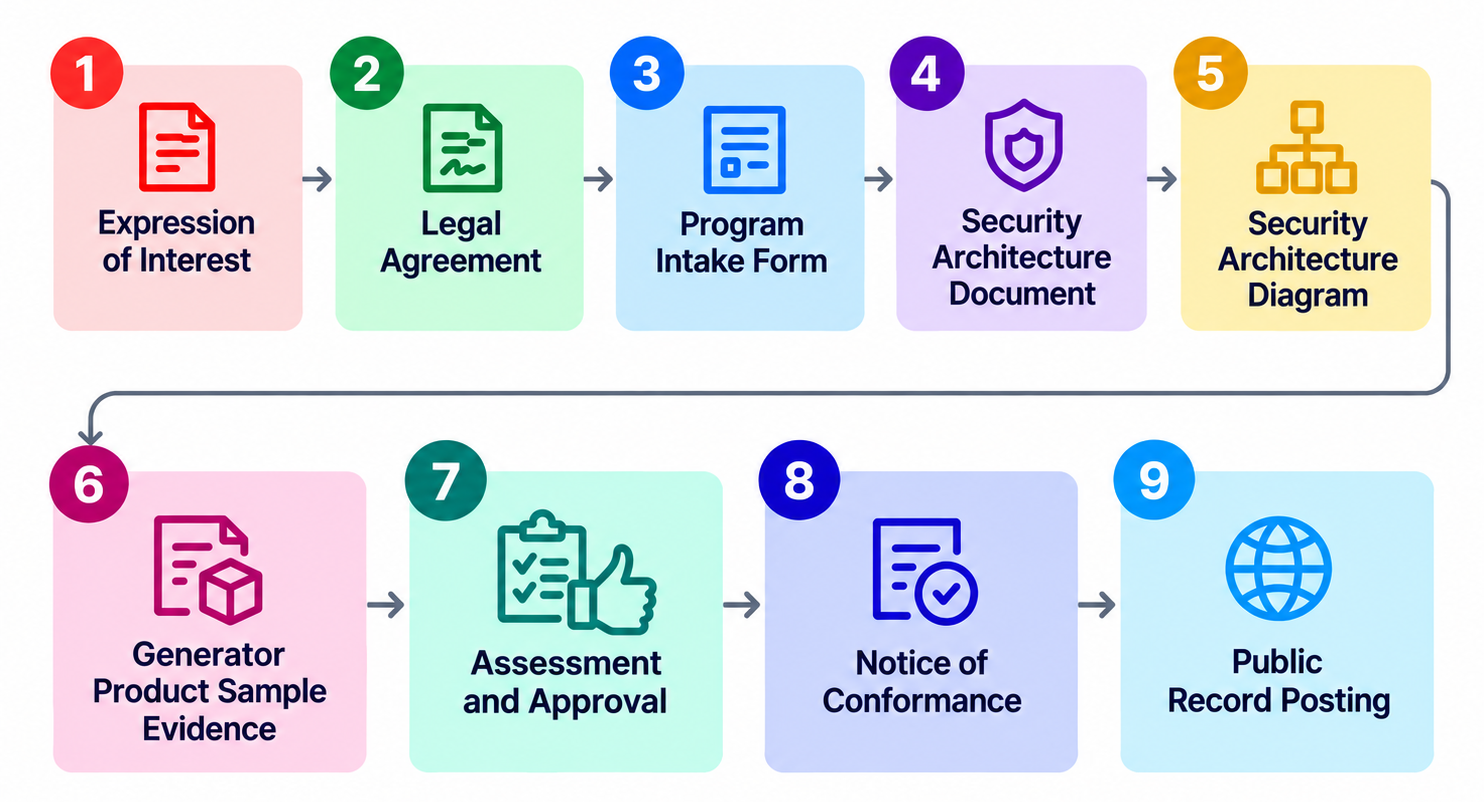
The conformance process has nine steps, as shown in this diagram. The following sections walk through the details of each step.
Example app
This guide walks through the conformance process using an open-source application called Conformance Example App applying as a generator product with a backend implementation class at assurance level 1.
This type of implementation uses on-premises servers or a commercial cloud. The example application generates its assertions, manifests, claims, and claim signatures on the server. It's a limited example that works only with JPEG files. It validates the files (signed or unsigned) as ingredients, edits them, and then outputs signed JPEG files.
The walkthrough shows the process as if you had developed the example app and were applying for conformance for it. Examples of the information you would enter or select are shown in italics. For your own application, enter information specific to you and your product.
1. Expression of interest form
When your product implementation is complete and you're ready to begin the conformance process, the first step is submitting the expression of interest form.
Enter the following information:
- Contact email: jane@example.com
- Legal organization name as registered with your jurisdiction: Example Corp.
- Legal business address: 123 Main St, Santa Monica, CA 90401
- Which type of product or service you are submitting (generator, validator, or certificate authority): generator
C2PA uses this information to draft your legal agreements, so enter the legal information exactly as it appears on your business registration, not a trade name or mailing address.
The product or service question lists the three product types described previously. You can select more than one, but each type requires a separate legal agreement process.
Select the checkbox for:
Generator Product
2. Legal agreements
Each product type for which you apply requires its own legal agreement signed by an authorized officer of the company.
If you apply as both a generator product and a validator product, you must sign separate agreements for each. C2PA has carefully developed and reviewed these agreements and expects applicants to accept them without modification.
After C2PA receives your expression of interest form, it will ask you to use the Linux Foundation's document signing service to execute the legal agreement. If you're not the authorized signatory for the company, forward the agreement to them through the signing platform.
Once you've signed the agreement, the program administrator will send an email directing you to complete the next step in the process: the C2PA conformance program intake form.
3. Intake form
C2PA will email you a link to the intake form where you enter information about your product or service that C2PA uses to populate the record on the conforming products list.
Legal business information and product category
On the first page, the form asks for legal business information for the public record.
Enter:
Email: jane@example.com
Legal organization name: Example Corp.
Legal Business Address: 123 Main St, Santa Monica, CA 90401
At the bottom of the first page, use the drop-down list to choose either certificate authority or a generator/validator product. The form displays different questions depending on your selection.
Select this:
Generator Product or Validator Product
Interoperability testing and specification compliance
In this step, you assert that you've complied with the specification and have performed interoperability testing.
Interoperability testing helps confirm that your claim generator complies with the C2PA specification. Test against at least one other conformant implementation that covers all functional aspects of your build. Later in the process, you'll provide interoperability samples to C2PA.
C2PA strongly recommends that you complete interoperability testing before submitting your product.
Select "Yes":
Yes
Specific product type
On a previous page, you selected that the product was in the generator or validator category rather than the certificate authority category. On this page, you indicate that the product is specifically a generator product. If you have a separate validator implementation on your website or your own verification site, you'll need to complete a separate application process for that product.
NOTE: Generator products often need to validate signed ingredients that are included when generating manifests. Validation of ingredients by a generator during signing does not require a separate validator product application. The intake form will cover this later.
Select "Generator Product" for the Conformance Example App:
Generator Product
Earliest disclosure
The next question applies if you're seeking conformance for a product that has not yet been released. In that case, specify a future date when you want the product to appear on the C2PA conforming products list.
This question doesn't apply to the example app, so select "N/A":
N/A
Specific product type
As noted earlier, there are three implementation classes: edge, backend, and distributed. Since the Conformance Example App performs the entire claim generation process on the server, choose Backend Class:
Backend Class
Certificate subject
The next several fields ask for information that will be included in the subject of the issued certificate.
Common Name (CN) -- The user-facing marketing name or model, or both, of the device, application, or service.
This value will also be the value of the CN field in C2PA claim signing certificates issued to instances of this generator product, if it's deemed to be conformant.
Enter:
Conformance Example App
Organization (O) -- Legal name of the applicant organization.
This value will also be the value of the O field in C2PA claim signing certificates issued to instances of this generator product, if it's deemed to be conformant.
Enter:
Example Corp.
Country (C) -- The two-letter ISO 3166-1 alpha-2 country code for the base of operations of the organization named in the O field.
This value will also be the value of the C field in C2PA claim signing certificates issued to instances of this generator product, if it's deemed to be conformant.
Enter:
US
Organizational Unit (OU) -- Optional. Department or subdivision within the applicant's organization that created this product.
This value will also be the value of the OU field in C2PA claim signing certificates issued to instances of this generator product, if it's deemed to be conformant.
Enter:
N/A
Generator product minimum software version
This field indicates your product's minimum software version number. Ideally, this should match your released version. Update it when you update your conformance record.
Enter:
1.0.0
Assurance level
In this field, enter the maximum assurance level, which tells a relying party how much confidence it can place in assertions and claims signed with a given C2PA claim-signing certificate.
Enter:
Assurance Level 1
An attestation method is not required for assurance level 1. When the form asks which key or integrity attestation methods your generator product can invoke, choose "None of the above".
Still image generation support and generated media types
On the next two pages, the intake form asks whether the application generates still images and then which media types the application generates. First, indicate that the application generates signed still images.
Enter:
Yes
The next page lists various media types. Select image/jpeg to match
what you listed previously:
image/jpeg
Other types of generation support
The next several pages ask the following questions:
- Does your Generator Product generate videos with C2PA manifests?
- Does your Generator Product generate audio files with C2PA manifests?
- Does your Generator Product generate documents with C2PA manifests?
- Does your Generator Product generate font files with C2PA manifests?
- Does your Generator Product generate Machine Learning Models with C2PA manifests?
Because the example app only signs still images, answer "No" for all these questions.
Still image validation support and validated media types
On the next two pages, the intake form asks whether the application validates still images and which media types it validates. First, indicate that it validates signed still images:
Yes
The next page lists the media types. Select image/jpeg to match what
you specified previously:
image/jpeg
Other types of validation support
The next several pages ask the following questions about file types:
- Does your Generator Product validate videos with C2PA manifests?
- Does your Generator Product validate audio files with C2PA manifests?
- Does your Generator Product validate documents with C2PA manifests?
- Does your Generator Product validate font files with C2PA manifests?
- Does your Generator Product validate Machine Learning Models with C2PA manifests?
Because the example app only validates still images as ingredients, answer each of those questions with "No".
4. Security requirements document
After you complete the intake form, prepare your generator product security architecture document.
The C2PA Generator Product Security Architecture Document Template provides a template to use. Complete it section by section. You must complete sections marked "Required" for your target level and then submit it to the C2PA conformance program as a Markdown file.
See an example in the Conformance Example App.
C.1.1 -- Applicant organization details
Example Corp.
123 Main St, Santa Monica, CA 90401
Jane Smith
jane@example.com
C.1.2 -- C2PA Conformance Program Version
0.2
C.1.3 -- C2PA Content Credentials Specification Version
2.4
C.1.4 -- Distinguished name
CN: Conformance-example-app
O: Example Corp.
OU: N/A
C: US
C.1.5 -- Generator Product Description
Conformance Example App is a web service that accepts user-uploaded JPEG images, automatically crops them server-side, and returns the cropped image signed with C2PA Content Credentials.
C.1.6 -- Target of Evaluation (TOE) Description
The TOE is the Conformance Example App backend running on a commercial cloud platform. It comprises an upload endpoint that authenticates the user and receives the image, a crop engine that produces the cropped output, an assertion source that derives assertions from the cropping edit the engine actually performed, a claim generator that builds the manifest from those assertions and requests signing, and the cloud KMS which holds the only copy of the claim signing key. The crop engine, assertion source, and claim generator run as components within a single service process, so the signer operates only on server-rendered output. The user's browser uploads the image and displays the result but performs no cropping, assertion generation, or claim signing.
C.1.7 -- Implementation Class
Backend.
C.1.8 -- Target Max Assurance Level
Level 1
C.1.9 -- Target generator Product capabilities
Claim generation: image/jpeg.
Claim validation: image/jpeg
C.2.1 -- Automated Certificate Enrollment Proof of Eligibility
- Certificate Enrollment Process: Certificate enrollment is a manual process performed by an administrator. Conformance Example App instances never enroll or rotate certificates themselves. The administrator generates a non-exportable signing key in the cloud KMS, creates a CSR, and submits it through the CA's portal. The issued certificate is stored in access-controlled configuration where the signing service reads it.
- Authentication Method & API Details: There is no automated enrollment API. The administrator authenticates to the CA's portal with an account protected by two-factor authentication.
- Management of Authentication Secrets: The only enrollment authentication secrets are the administrator's CA portal credentials, which are protected by two-factor authentication and are never stored by the Generator Product.
C.2.2 -- Confidentiality of the Claim Signing Key
- Key Generation & Storage: The claim signing key is a P-256 ECDSA key (NIST-approved) generated and stored in the cloud KMS, non-exportable and encrypted at rest.
- Access Controls & Encryption: Only the signing service's service account can invoke signing, following least privilege. The key is encrypted at rest in the KMS and never leaves it.
- Ephemeral Plaintext Key Handling: Not applicable. The key is non-exportable and plaintext key material never leaves the KMS.
- Key Rotation Process: Rotation is performed by generating a new KMS key and re-enrolling for a certificate.
- Subsystem Mutual Authentication & Role Validation: Upload requests are authenticated with user session tokens before any signing occurs.
C.2.3 -- Protection of the Claim Generator
- SCA / SBOM Scanning Tools: OSV-Scanner is run against the dependency lockfile before every deploy, as a documented operational convention of the deployment process.
- 90-Day Remediation Policy: Deployment is a manual administrator action. Any CRITICAL or HIGH finding (CVSS v3+) blocks the deploy until the affected dependency is updated, satisfying the 90-day remediation requirement.
C.2.4 -- Protection of Assets & Assertions at Generation
- SCA / SBOM Scanning Tools: The upload handler, crop engine, and signer live in one codebase covered by the same OSV-Scanner scan described in 2.3.1.
- 90-Day Remediation Policy: The same convention applies: CRITICAL or HIGH findings in content-processing software block deployment until the affected dependency is updated.
C.2.5 -- Protection of Traffic Between Subsystems
- TLS 1.3 & Cryptographic Protocols: Communication between subsystems is encrypted in transit with TLS terminated by the cloud provider. The signing service's calls to KMS and storage negotiate TLS 1.3. Cropping and signing run in a single process, so there is no other inter-subsystem network traffic.
C.2.6 -- Protection of the Hosting Environment
- IAM & Role-Based Access Control (RBAC): Cloud IAM with role-based access control governs all resources in the TOE.
- Principal Access Policies: The service runs under a dedicated service account with only the permissions the signing pipeline needs; administrators use accounts protected by two-factor authentication.
- Cloud Resource IAM Policies: IAM policies restrict the KMS key, storage buckets, and signing configuration to the signing service's service account and administrators.
- Vulnerability Scanning & OWASP Top 10 Coverage: Dependency scanning is performed before every deploy (2.3.1), and a periodic security review covers the OWASP Top 10 web application vulnerabilities.
- Timely Remediation Policy: CRITICAL and HIGH dependency findings block deployment until resolved; identified vulnerabilities are tracked and remediated within the required timelines (30 days High, 90 days Moderate, 180 days Low). OS patching is handled by the managed cloud platform.
5. Security requirements diagram
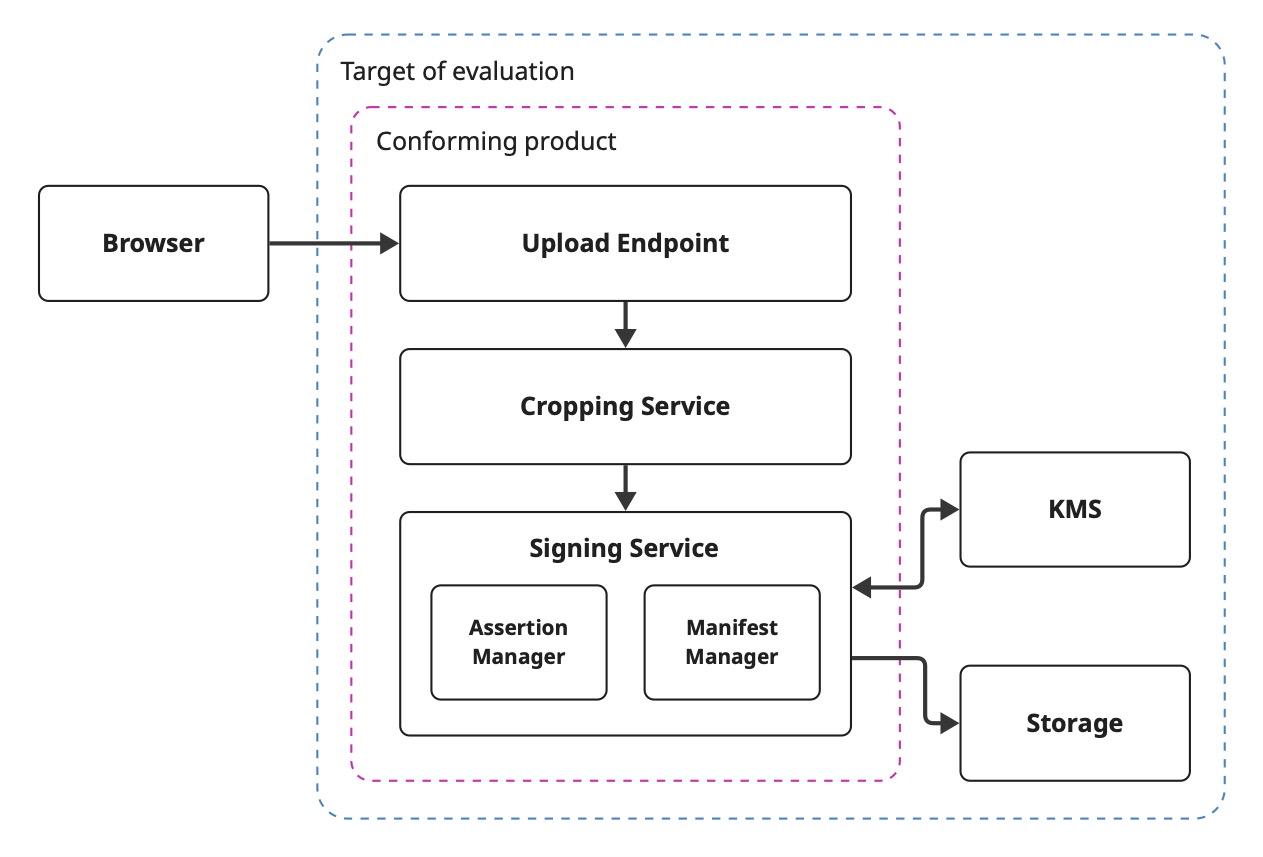
Your security architecture document should include a diagram of your TOE in section C.1.6. It gives the conformance evaluator a clear picture of your system at a glance. Although not required, you can follow the convention in Appendix A of the Security Requirements document. Use a blue dashed border for the target of evaluation and a pink dashed border for the conforming product inside it.
The target of evaluation boundary contains everything your product depends on to produce signed assets. The conforming product boundary contains only the components that generate assertions, construct manifests, and request claim signing. For conformance-example-app, that's the upload endpoint, crop engine, and signing service. The KMS and storage are trusted infrastructure inside the TOE but outside the pink boundary, and the browser sits outside both with an arrow pointing in.
6. Sample evidence
Once you submit your application materials, the conformance administrator will request sample evidence. You'll provide a signed output file for every media type you listed as generated or validated on your intake form, along with the crJSON or JSON manifest report for each one.
If your product validates specific media types as ingredients, your samples must show that ingestion for each one. The conformance program maintains a library of conformant sample assets you can use as ingredients. Your manifest reports should show that each ingredient is valid and its signing credential is trusted, so configure the C2PA Trust List and C2PA TSA Trust List before validating. If the library doesn't include a conformant asset for a media type you need, you can sign an asset of that type with a test certificate to demonstrate validation for that media type.
Use these samples to demonstrate the interoperability testing you asserted on the intake form.
The Conformance Example App opens one of the library's conformant JPEGs, adds it as an ingredient, crops it, and signs a new manifest recording the crop action and the ingredient. Submit the signed JPEG with its crJSON manifest report.
For example, the Conformance Example App configures trust in manifestManager.js.
The Conformance Example App then opens the existing file and adds it as an ingredient later in manifestManager.js.
7. Assessment and approval
Assessment
The administrator reviews everything you've submitted against the program requirements, including your intake form, security architecture document and diagram, and sample evidence. Expect questions by email during this step.
The administrator returns a conformance review report that walks through your security architecture document objective by objective. For each requirement at your target level, the report gives a verdict of "meets," "does not meet," or "not applicable," with reviewer notes explaining the finding. It closes with an overall verdict and a list of required remediation steps. If you receive a "Not Conformant" verdict, address each remediation step, update your document or implementation, and resubmit.
If you need implementation help during this phase, ask in the #c2pa-conformance channel on the CAI Discord server.
Once the administrator is satisfied, your record goes to an approver.
Approval
The program requires at least two people to sign off before final acceptance and approval. After the administrator recommends your product, a separate approver reviews your record and supporting evidence. If the approver finds non-conformities or has questions, they'll send them to you for answers or remediation.
When both the administrator and the approver are satisfied, your final record is ready for publication.
8. Notice of conformance
After approval, the administrator sends you a digitally signed Notice of Conformant Status letter. The letter confirms your product is conformant at your maximum assurance level and includes your product's record for the conforming products list. The record contains a record ID, your legal organization name, your product's distinguished name (DN) values, minimum software version, assurance level, supported specification versions, the media types you generate and validate, and relevant dates.
You can then provide this letter to a CA on the C2PA Trust List to obtain your production claim-signing certificate.
9. Public record posting
Before publishing, the administrator previews your record and confirms its contents. C2PA then adds your record to the C2PA Conforming Products List, typically within 72 hours of the notice, or on your earliest public disclosure date if you set one in your application. You can view published records using the Conformance Explorer.
Your record covers the product as submitted. If you make a material change, meaning a change to anything in your record or to how your product meets the security requirements, you must reapply and receive a new record ID.